I added my website - what happens now?
Learn what dislike404.com does after you add your website, how to read your scan results, and what the different status codes mean.
Your first scan
After adding your website, your first scan will start immediately — with a reduced page limit. If you verify your site, you can trigger a new scan to take full advantage of the higher page limits. Verification is entirely optional, though — if the default limit works for you, there's nothing else you need to do.
How long the scan takes depends on the size of your website. A small site with a few pages may finish in minutes, while larger sites can take longer. You can watch the progress in real time from your dashboard.
Scan frequency
After the first scan, dislike404.com will automatically re-scan your website at the interval you configured — anywhere from daily to monthly. You can change this at any time in your website settings. If you want to run a scan immediately, you can always trigger one manually from your dashboard.
Understanding your results
Every URL that dislike404.com crawls is listed in your results. For each URL you will see:
The crawled URL — the full address that was checked
HTTP status code — the response your server returned
Response time — how long the request took
Internal or external — whether the link points to your own domain or an external website
Not sure what a specific status code means? Check out our HTTP Status Code Reference.
When errors are found
If dislike404.com detects any issues, you will receive an email notification with a direct link to your scan results — depending on your notification settings. In your results, the Errors tab is pre-selected, showing all URLs with a status code of 400 or higher, as well as any connection failures.
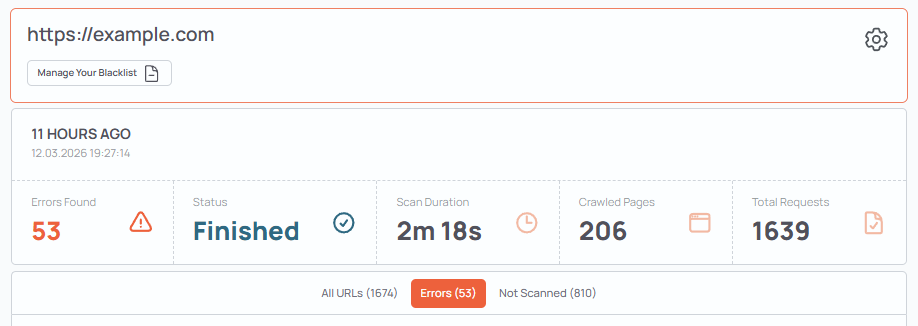
What to do next depends on the type of error and whether the affected URL is on your own website or an external site you link to. We cover the different scenarios in our HTTP Status Code Reference.
Verified vs. unverified websites
If you have not yet verified your website, scans are limited to a smaller number of pages and requests. This limit exists to ensure that dislike404.com is only used to scan websites you actually own or manage.
Once you verify your website, the limits are significantly increased and you unlock additional scan settings — including higher thread counts for faster scans and increased page and request limits.